![[ EDINet ]](http://www.ediq.com/images/EDINETLO.gif)
EDINet enables businesses to electronically transmit forms to other businesses
and trading partners over the Internet. The following is a description of how this process would occur.
- Using an Internet Web page, the type of
form (i.e. invoice, purchase order, etc.) is selected and the information is entered via
one of several common templates.
- The form is submitted to the EDINet server to
perform any calculations.
- The form information is then converted to EDI or non-EDI format
and electronically transmitted via ftp, email, or fax to the receiving organization or
business.
- The sender receives an acknowledgment that the receiver received the data in one
of several ways, including: a web page, email, ftp, fax or pager.
System Overview
EDINet can be used to manage and track purchase orders, shipping notices and invoices
throughout the entire enterprise procurement process. EDINet is packaged as a self
contained system unlike other EDI processes that act as a service/third party transmitter.
The enterprise using the EDINet systems is not charged by the volume of transactions
processed but purchases a system that will handle the entire transaction process. The
EDINet system is scalable as the number of enterprise transactions increase so can the
EDINet system, and thus remain cost effective.
Enterprises using the EDINet system may also share valuable information with its
vendors and customers using EDIQ EnterFrame Intranet, Extranet and Web servers. These
value added servers in accordance with EDINet provide a diverse number of Internet
processes for the enterprise.
The form flow from business to business is represented in the following figure.
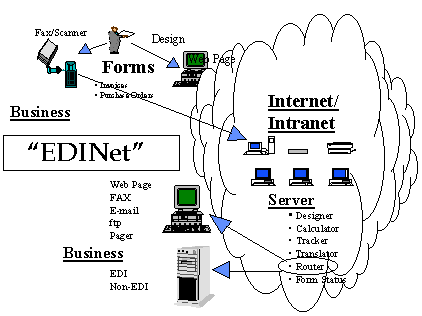
There are a variety of methods that the document can be submitted to the EDINet
server for conversion to a data format and then transmitted to the receiver.
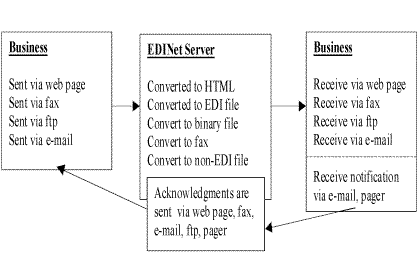
Here are a few particular examples of how a business could use EDINet to transmit business forms
over the Internet.
- A business sending a purchase order or invoice to a trading partner using a web page:
- Using the EDINet web page the business would enter the information that will be passed
to the trading partner.
- The business selects the data format(s), i.e. web page and EDI, in which the information
will be sent. The trading partner can receive the information in more than one format.
- Next the business selects the method(s), i.e. pager and fax, to notify the trading
partner that the information has been sent.
- The business then selects the method(s), i.e. email and pager, in which the return
acknowledgement will be sent indicating the document has been received.
- The information entered on the web page is submitted to the EDINet server for conversion
to EDI.
- The tracking and status of the document are always available using a web page.
- A business sending a purchase order or invoice to a trading partner via a fax.
- Using the EDINet web page the business would select the fax and EDI as the method(s) of
transferring information to the trading partner. The trading partner can receive the
information in more than one format.
- Next the business selects the methods(s), i.e. email and fax, to notify the trading
partner the information has been sent.
- The business then selects the method(s), i.e. email and pager, in which the return
acknowledgement will be sent indicating the document has been received.
- The business sends the information to the EDINet server using a fax. The information is
then converted to EDI format.
- The tracking of the document is always available using a web page.
- A business receiving a purchase order or invoice from a trading partner using a web page.
- Using the EDINet web page the trading partner would enter the information that will be
passed to the business.
- The trading partner also selects the data format(s), i.e. EDI, in which the information
will be sent.
- Next the trading partner selects the method(s), i.e. pager , to notify the business that
the information has been sent.
- The trading partner then selects the method(s), i.e. email, in which the return
acknowledgement will be sent indicating the document has been received.
- The information entered on the web page is sent to the EDINet server for conversion to
EDI.
- The tracking and status of the document is always available using a web page.
- A business receiving a purchase order or invoice from a trading partner via a fax.
- Using the EDINet web page the trading partner would select fax as the method of
transferring information to the trading partner.
- Next the trading partner selects the method(s), i.e. pager, to notify the business that
the information has been sent.
- The trading partner then selects the method(s), i.e. email, in which the return
acknowledgment will be sent indicating the document has been received.
- The information is sent using a fax.
- The tracking and status of the document is always available using a web page.
Features
EDINet provides numerous features which will be beneficial to your company including:
- Unlimited number of trading partners
- No software to install in user machine
- Uses library of existing form templates
- Easily integrated with existing systems - Import file - No need to re-key large amount
of information
- Multiple methods of notifications of data receipt and acknowledgments
- Compatible
- Scalable
- Redundant and Fault Tolerant
- Open Architecture
- Real time monitoring of system
- Integrate to Legacy Systems via fax
- Performs form calculations
- Converts data to EDI ANSI format or non-EDI format
- Acknowledgments receive via web page, email, fax, pager
Document Management
EDInet's management of the document through a quality control process is essential not
only to the security and reliability, but to overall customer satisfaction as well.
Knowledge of where the document is at all times as well as the status of the document are
fundamental necessities. In order to ensure this reliable document management system
numerous processes are executed including:
- Document tracking
- Tracks order based on due date
- Query - reporting on customer - order data.
- Rollup order and all supplement orders
- Save order, place order on hold, summit, cancel
- Automatic pricing
- Matching invoice to purchase order
- Archiving
- Create Custom Form (POs & Invoices)
- Forms revision control
- Templates for input/output
- Management of document receipt
- Document acknowledgment
- Event notification
Data Transformation
Transformation is the process by where the document is converted to a standard format
for the most efficient utilization by the receiver.
- Translate data to ANSI X12 850/810 transaction set
- Translate data to non-EDI format
Administrator
Administrating the system has been recognized as fundamental to success and
consequently an extensive number of features have been developed including:
- Registration/Log-on management
- Resource management/logs and usage analysis/server monitoring, status and notification
- Schedule tasks
- Trading partner management
- Trading partner reporting
- Tracking of vendor/trading partner performance
Communications Features
The convienece that communication from multiple protocols provides a company is
maintained by the following systems supported in EDINet:
- Authenticated Email - Automatic
- Binary Files
- Basic C4 Conversion
- HQX
- Hexadecimal
- WWW
- FTP
- TCP/IP
- Fax - Analog/OCR/Forms Entry
- Pager
- Form to Email-Fax-Pager
- Intelligent Notification via Email, Pager, Fax
- ISO
- OBDC
- SQL Server
- 9 Track Tape
Security Features
Security is crucial when utilizing the Internet to do business. Various security
processes employed by EDINet include:
- WWW Authentication
- Full SSL 128 Bit RSA Encryption
- Profiling
- Fax
Standards Implementation
- EDIINT - Partial Implementation
- RFC 1767 - Partial Implementation
- Commerce Net Interoperability Test Team - Partial Implementation
Server Supporting Features - Value Added
EDIQ offers a multitude of other internet related activities as value added features.
This is to ensure the customer not only receives EDINet as a purchase order/invoice
manager, but also has access to other Internet related activities. These features will
provide a total solution to their Internet needs. The value added features available from
EDINet include:
- Intranet/Extranet
- Intranet Workgroups
- Quality Management
- Web-Site Management
- Web Server: Frames, Redirection, Logs, etc.
- Multi-Media Support: Video, Java & JavaScript, Sound
- X322
- Remote Management
- Infinite Forms Management
- Scalable
- Redundancy/Recoverability
- Database, and Connectivity, ODBC, Oracle, Mainframe, SQL, Sybase, etc.
Future Additions
Future versions of EDINet will include the following features, as well as others:
- Security on all transactions via S/MIME, digital signatures
- Any-to-any translator (EDI and non-EDI)
- Analyze existing customer service profile
- Analyze all pending orders for the customer
- Enhanced integration with legacy systems
- Cataloging/Inventory Management
- A-sync, B-sync